The automation is the easy part. The ethics are not.
Why generic AI is the wrong starting point▾
Any developer can bolt a chatbot onto a law-firm site. The hard part is keeping it on the right side of confidentiality, unauthorized practice, and attorney-advertising rules. That is the part I own, as a California attorney who also builds these tools.
Off-the-shelf AI is built for retail, not regulated practice
Generic chatbots give legal conclusions, promise outcomes, and imply representation. On a law-firm site that is a discipline problem, not a feature.
A lawyer who also builds the systems
I am a California attorney who builds and runs these tools daily. I review the architecture and the disclaimers, then design escalation so a licensed attorney stays in the loop.
Pick the kind of automation you are dealing with
Open the automation-type picker▾
Five common builds: an intake chatbox, structured legal intake and routing, a document generator, an AI implementation audit, or a website and disclaimer review. Each tab below covers what it is, what I build, and who it is for.
AI intake chatbox
Most requestedA conversational front door that answers general questions, gathers facts, and routes serious matters to a human, without crossing into legal advice.
💬 What it is
- Visitor-facing assistant on your site
- General information plus fact-gathering
- Hands off to a person on real matters
🔧 What I build
- Scope, prompt, and guardrail design
- Disclaimers and consent text
- Escalation and human-review routing
👤 Who it is for
- Law firms wanting after-hours intake
- Professional-service businesses
- Anyone whose current bot over-promises
Structured legal intake & matter routing
ConversionA guided form or flow that captures the facts you actually need, screens for conflicts and jurisdiction, and sorts each lead into the right matter type before it reaches you.
💬 What it is
- Question-by-question fact capture
- Jurisdiction and conflict screening
- Matter-type classification
🔧 What I build
- Intake question sets per matter type
- Routing and tier-recommendation logic
- Notification and summary delivery
👤 Who it is for
- Firms drowning in unqualified leads
- Practices with several matter types
- Teams that want clean handoffs
Legal document-generation tools
ThroughputTools that turn structured inputs into draft documents at volume, using authority rules an attorney sets, with attorney review routing wherever legal judgment is required.
💬 What it is
- Structured input to draft document
- Template and clause libraries
- Batch generation from one workbook
🔧 What I build
- Authority rules and clause logic
- Workbook-to-document workflows
- Review-routing for legal-judgment steps
👤 Who it is for
- High-volume document operations
- Professional-service firms
- Teams replacing copy-paste drafting
AI implementation audit
Risk controlA structured review of how AI already touches your practice: what data it sees, what it tells clients, where it could form a relationship or give advice, and where the ethics rules bite.
💬 What it is
- Inventory of every AI touchpoint
- Confidentiality and data-flow map
- Ethics and advertising-rule check
🔧 What I build
- Findings memo ranked by risk
- Use policy and supervision rules
- Escalation and disclosure language
👤 Who it is for
- Firms that adopted AI ad hoc
- Practices facing a bar inquiry risk
- Leadership wanting a defensible record
Website & disclaimer review
Fast winA focused read of your public AI claims, chatbot disclaimers, and site language, to close the gaps that create attorney-client-formation or unauthorized-practice exposure.
💬 What it is
- Review of public AI marketing claims
- Chatbot and tool disclaimer review
- Attorney-client-formation language
🔧 What I build
- Rewritten disclaimers and notices
- Consent and no-advice language
- Prioritized fix list with sample copy
👤 Who it is for
- Anyone with a live AI feature
- Firms unsure their disclaimer holds
- Fast, flat-fee starting point
The components I design and review
See the eight components▾
Eight discrete pieces I build into a new system or fix inside an existing one. Most engagements combine three or four.
Intake chatboxes
Attorney-directed assistants scoped to inform and gather facts, never to give jurisdiction-specific advice.
Matter routing
Classification and routing logic that sorts each inquiry into the right matter type and the right next step.
Document-generation tools
Tools that turn structured inputs into draft documents using attorney-set authority rules.
Website & disclaimer review
A focused pass on public AI claims, chatbot disclaimers, and no-advice and consent language.
Workbook-to-document workflows
Pipelines that take one structured workbook and generate batches of drafts for review.
Engagement-letter automation
Generation of engagement and disclosure letters from structured inputs, with review routing built in.
AI use policy
An internal policy governing what staff may put into AI tools, what is off-limits, and who supervises.
Escalation rules
Explicit triggers that hand a matter to a licensed attorney the moment it crosses into legal judgment.
Where unmanaged legal AI gets firms in trouble
Confidentiality & data handling
Client facts or documents flowing into third-party AI without a data agreement, retention control, or training opt-out.
How I reduce this risk▾
- Map exactly what client data each tool sees and where it goes.
- Lock down vendor terms, retention windows, and any training opt-out.
- Write explicit rules for what the tool may and may not ingest.
Unauthorized practice of law (UPL)
An automated tool giving jurisdiction-specific legal conclusions or applying law to a user's facts without a licensed attorney.
How I reduce this risk▾
- Scope the tool to general information and fact-gathering only.
- Build escalation that routes anything resembling advice to a licensed attorney.
- Strip jurisdiction-specific legal conclusions from automated replies.
Overpromising & outcome guarantees
Marketing or chatbot copy that predicts results or implies a guarantee, which collides with attorney-advertising rules.
How I reduce this risk▾
- Rewrite public claims to be accurate and non-promissory.
- Strip outcome and guarantee language from automated replies.
- Align the copy with attorney-advertising rules before it goes live.
Client confusion & attorney-client formation
Users believing a chatbot created an attorney-client relationship, or that its output is vetted legal advice.
How I reduce this risk▾
- Add clear no-advice and no-relationship notices where users actually see them.
- Put consent gates in front of anything that could imply representation.
- Route serious matters to a human so expectations match reality.
Deep diveHow I score these risks, and the authorities behind them▾
The four failure modes above are the ones I look for first. Each gauge shows typical exposure for an unmanaged off-the-shelf deployment; expand a gauge for how I reduce it. The ratings are calibrated to the common case, and your facts can move the needle either way.
These ratings are a starting framework, not a substitute for a review of your actual setup. Confidentiality and UPL sit at the top because they map to the duties most likely to draw a bar inquiry or a malpractice claim: the duty of confidentiality and the prohibition on the unauthorized practice of law. Advertising and client-confusion risks are graded medium because they are usually fixable with disclosure and copy changes, though they can escalate quickly if a tool predicts outcomes or implies representation.
In a paid review I cite the operative authorities for your jurisdiction. For California work that includes the Rules of Professional Conduct on competence, confidentiality, fees, supervision of non-lawyer assistance, and communication, plus Business and Professions Code provisions on the unauthorized practice of law and attorney advertising. I confirm the current operative text of any rule before relying on it; I do not quote from memory.
I am a California attorney. For matters governed by another state's rules, I will tell you plainly where you need local counsel rather than guess at another jurisdiction's bar rules.
One workbook, large batches of engagement letters
Workbook to engagement letters
Structured input -> authority rules -> generated drafts -> attorney-review gate
Open case studyProfessional-service firm: workbook-driven engagement-letter generation▾
A worked example of the architecture I design. Details are generalized and the client is not identified.
How the system is structured
A professional-service firm needed to produce large batches of engagement letters from a single structured workbook, without a person retyping each one. I designed the rules and the architecture; the tool generates drafts from structured inputs; where legal review is required, the workflow routes documents for attorney review.
Structured workbook
One spreadsheet of validated inputs is the single source of truth.
Attorney-set rules
I encode the authority rules and clause logic that govern each draft.
Drafts generated
The tool, with an attorney-directed AI helper, produces draft letters at volume.
Routed for review
Where legal judgment is required, documents route to attorney review before use.
Important: the tool generates drafts from structured inputs. The drafts are not automatically attorney-vetted by being produced. Documents that require legal review are routed for attorney review in the workflow before they are relied on or sent.
What I owned: the rule design, the clause logic, the architecture of the workflow, the attorney-review routing, and the disclaimers and use constraints around the AI helper.
What the firm got: a repeatable pipeline that turns one structured workbook into batches of consistent drafts, with a clear line marking where a licensed attorney reviews before anything is used. The throughput gain comes from removing manual retyping, not from removing the lawyer.
What I do not claim: I do not claim the machine output is finished legal work the instant it is generated, and I do not design these systems to imply that. The value is a disciplined pipeline with the review step built in, not an unsupervised document machine.
You are standing inside one of the systems I build
See the six live examples on this site▾
The chatbox, calculators, generators, intake flows, and cross-linking on this site are working examples of what I build. Try the AI Legal Analyst in the corner; the rest are below.
AI Legal Analyst
The attorney-directed chatbox on this page, scoped to inform, not advise.
Calculators
Tools that compute a result, then explain it in plain language.
Document generators
Structured-input tools that produce draft documents from your answers.
Intake flows
Guided question sets that capture the right facts and route a clean summary to a human.
Related-resource routing
Cross-linking that sends each visitor to the next most relevant page.
Disclaimers in context
Every tool here carries a no-advice, no-relationship notice I write and review.
The intake system, screen by screen
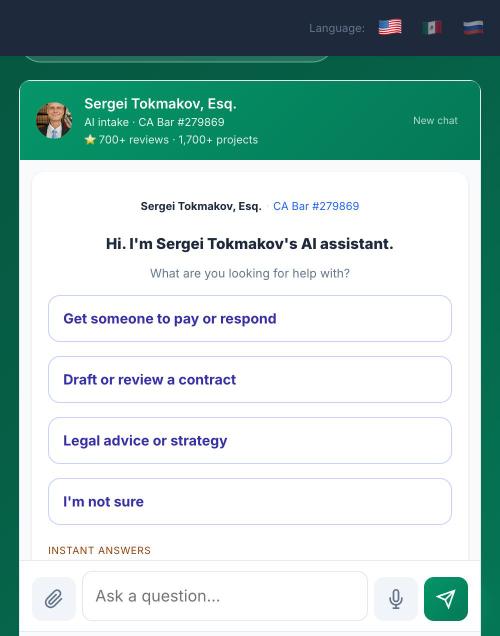
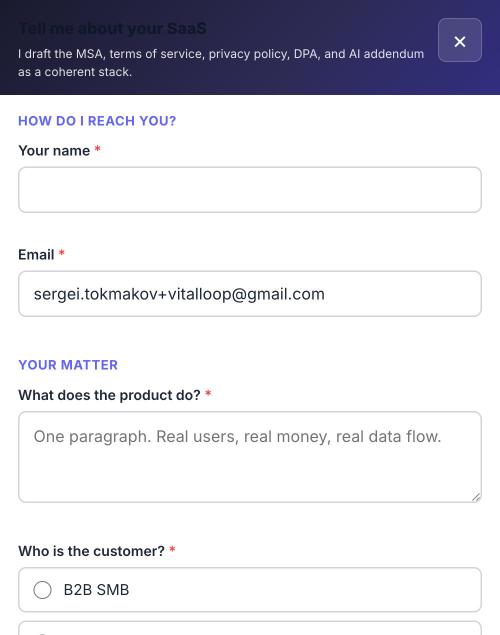
You are already standing in one of these systems. These are the live screens from my Healthcare SaaS legal package page, the highest-value product line I run. Across 278 sessions the system averages 4.3 exchanges and 1.9 minutes before it either routes someone to a fixed-fee package or tells them they do not need to hire anyone.
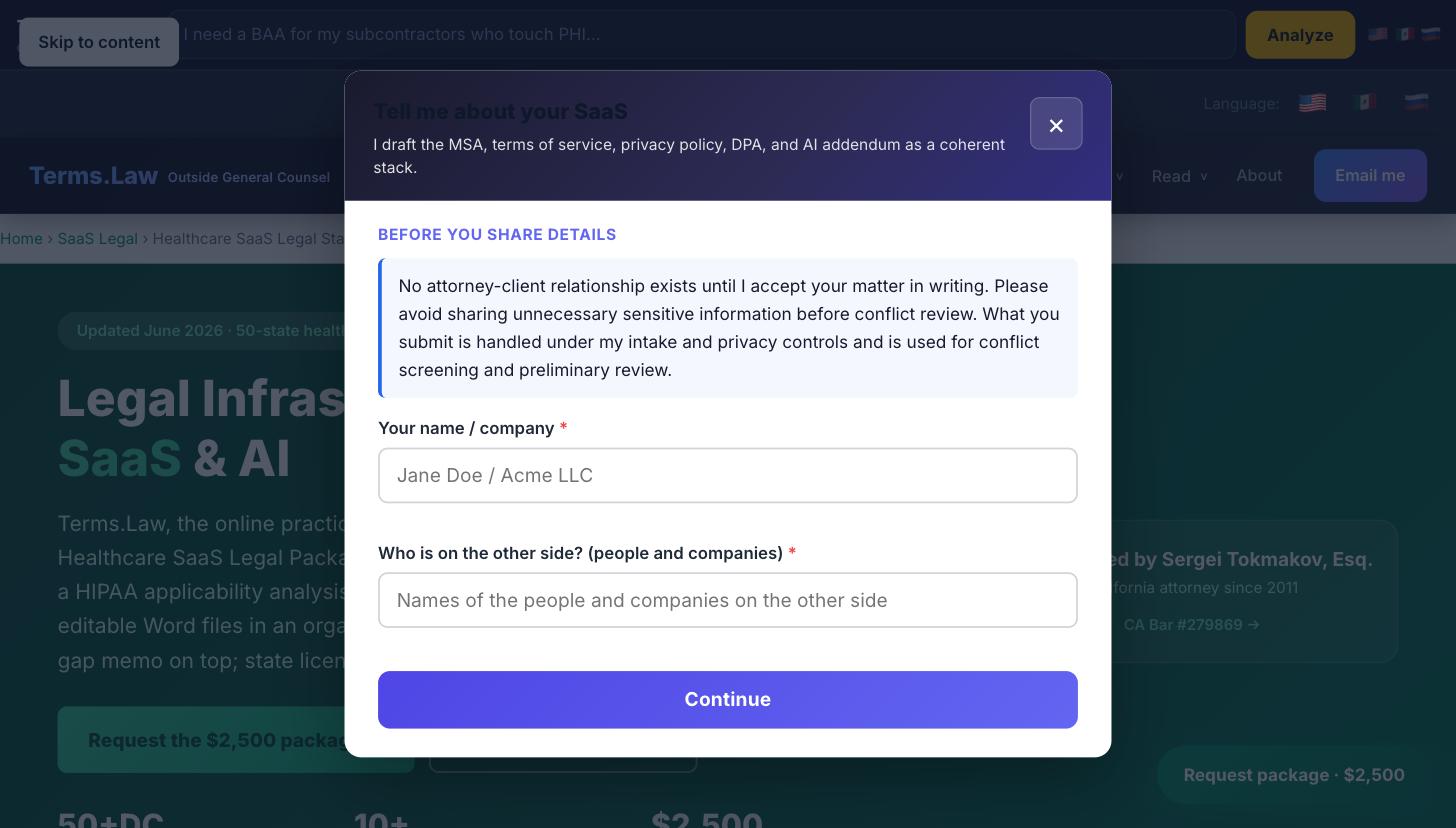
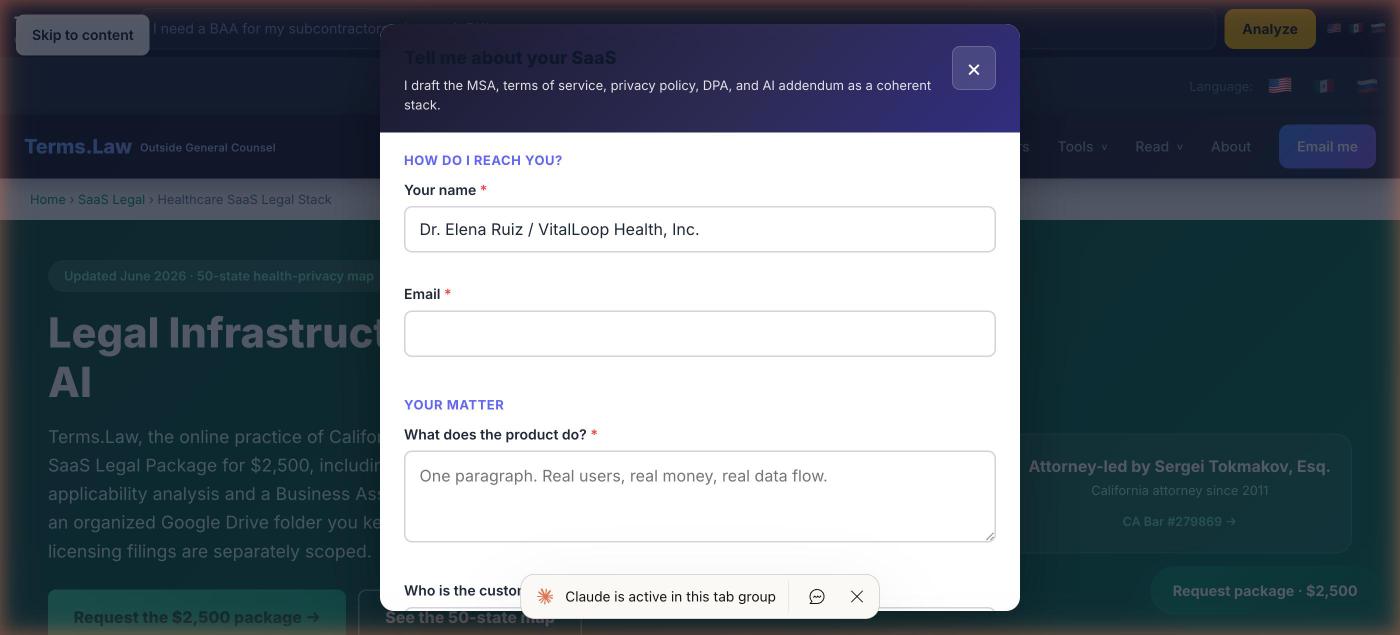
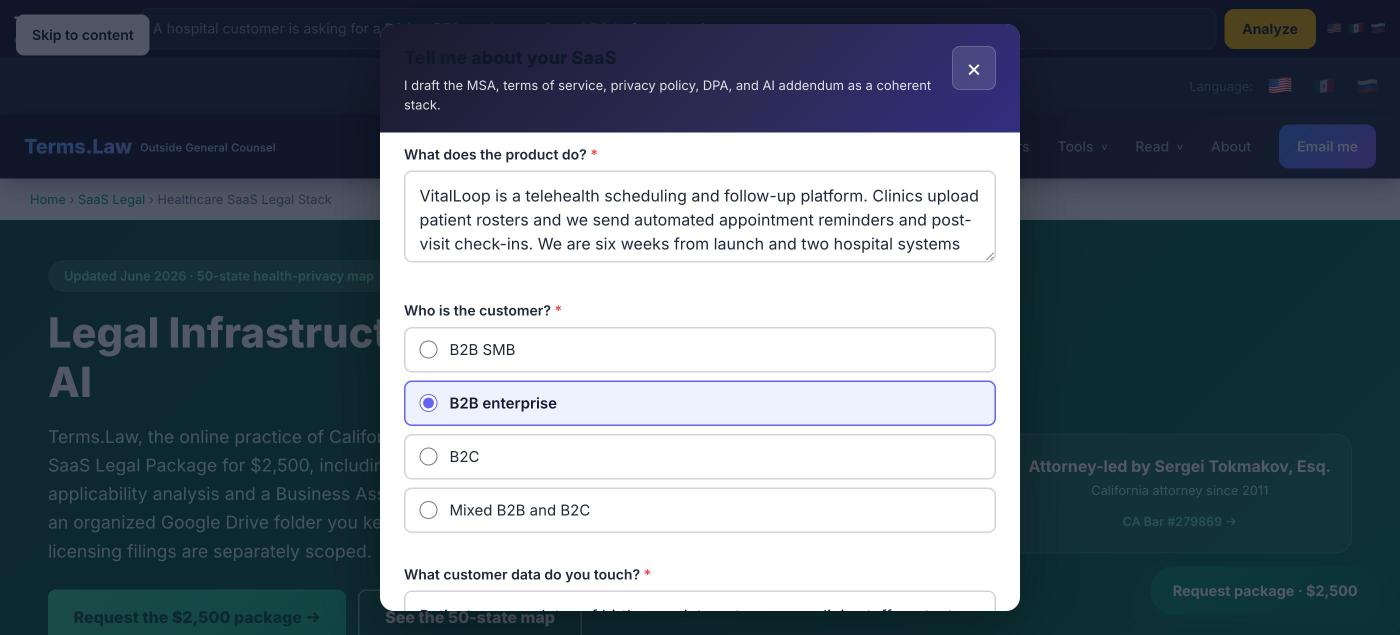
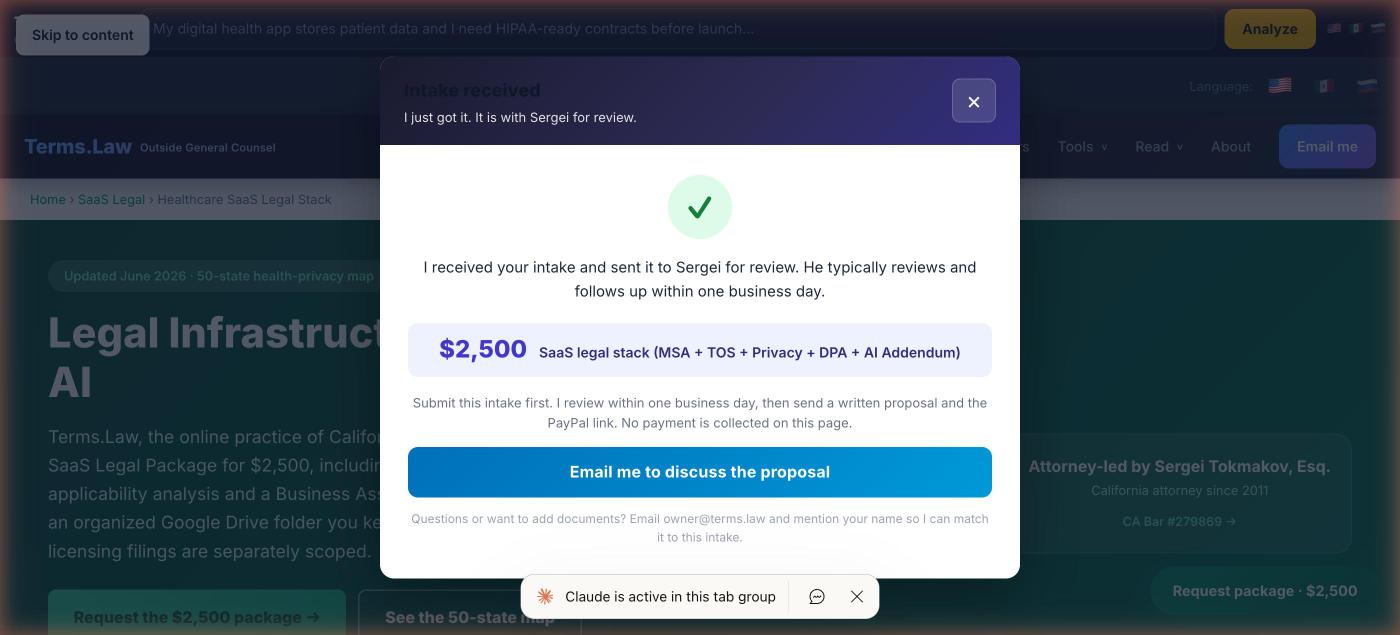
Screens captured from the live site. Prospect details shown are a test submission, not a real client.
What the same flow looks like on a phone
Roughly half of legal intake arrives on mobile, and mobile is where most firm intake quietly breaks. Both the conversational entry point and the structured form collapse to one column with full-width tap targets, and nothing scrolls sideways.
What this actually produced, in numbers
Measured from live production on my own site, not projected:
- 197 leads captured through the chat and intake path.
- $8.4 million in total matter value disclosed by visitors describing their situations.
- 4.3 exchanges, 1.9 minutes per session on average. That is the qualifying conversation a fifteen-minute intake call would otherwise consume.
- 4 visitors were told they did not need to hire anyone. A screening layer is worth more than a lead vacuum, because unqualified leads cost attorney time, which is the only inventory a practice has.
The uncomfortable part, stated because a vendor who claims no limitations is not worth hiring: the email-capture rate is 14 percent, and building this surfaced several failure modes that only appeared under live traffic. Anyone who tells you it is a weekend project has not run one in production.
See how I review and mark up a contract
I deliver your documents as editable Word files in an organized Google Drive folder you keep, with a summary memo on top. Below is a demo of the AI-assisted redlining I build as a separate legal-tech project: edit a field and the agreement redrafts itself in a live preview, with only the changed words highlighted, and a built-in risk panel flags terms like uncapped liability. This is a working sample built around a made-up company, not the format your documents arrive in.
Open the live demo → See the live AI governance workroom demo →Try the live demo right here, no new tab
Pick a document tab (NDA, MSA, or SOW), edit a field, and watch the live preview on the right. Try setting the MSA liability cap to "uncapped" to see the risk panel react. Sample only, made-up company, not legal advice.
Start with a review, or scope a full build
How the pricing works▾
Flat-fee reviews start instantly. Build, configuration, and audit engagements start by intake so I can size the work and quote it accurately before anyone pays.
A written findings memo on your public AI claims, chatbot scope, disclaimers, and UPL exposure, with specific fixes ranked by risk.
- ✓ Public AI claims & advertising language
- ✓ Chatbot scope, disclaimers & consent
- ✓ Confidentiality & data-handling claims
- ✓ Attorney-client-formation risk
- ✓ Prioritized fix list with sample copy
Flat fee, written deliverable. Email intake to start.
Three fixed-fee programs: $10,000 Practice Implementation Sprint · $20,000 Firm AI Operating System · $30,000 Firmwide Transformation. Intake chatboxes, document-generation workflows, and routing systems, scoped to your practice.
- ✓ Scope, prompt & guardrail design
- ✓ Disclaimers & escalation rules
- ✓ Matter routing & intake question sets
- ✓ Configuration with your vendor stack
Scoped & quoted by intake, not instant checkout.
A full review of how AI touches your practice: data flows, client-facing claims, advice and formation risk, supervision, with a ranked findings memo.
- ✓ Inventory of every AI touchpoint
- ✓ Confidentiality & data-flow map
- ✓ Ethics & advertising-rule check
- ✓ Use policy & supervision rules
Scoped & quoted by intake, not instant checkout.
Ongoing tuning, prompt and disclaimer updates, and standing automation counsel as your tools and the rules evolve.
- ✓ Periodic tuning & copy updates
- ✓ Disclaimer & policy refresh
- ✓ Standing automation-counsel access
- ✓ Scoped to your volume
Scoped to your volume. Email intake to start.
Post-delivery support is stated in each program's written scope. New documents, counterparty negotiation, and new matters are quoted separately.
Prefer a written second opinion first?▾
Prefer a written second opinion before committing to a build? Start with a $300 Written Attorney Consultation or a the $300 written attorney consultation.
PaymentHow you pay, and when work starts▾
The $1,000 AI website and chatbot risk review is a flat fee with a written deliverable; pay and send the public links and I begin. The written second opinion is the $300 Written Attorney Consultation. Implementation programs (the $10,000–$30,000 tiers) are scoped and quoted by intake first, so I can size the work and confirm the fee in writing before anyone pays. I do not put a checkout button on the build and audit tiers because the right fee depends on what you are building.
DeliveryWhen you get the work back▾
Drafts in 2 to 3 business days, even for complex agreements. I work weekends when a matter needs it and it is engaged. The flat-fee risk review comes back as a written findings memo with fixes ranked by risk. Build and audit timelines are confirmed in the scope I send you before the engagement starts.
After you startWhat happens next, and scope▾
After you pay (or after I confirm the build / audit scope), send the public URL, the chatbot link, your practice areas and jurisdictions, your current disclaimers, and a description of the workflow. You do not need to share privileged client data to begin; if a deeper review needs anything, I tell you what to redact first.
The flat-fee review covers the defined scope: your public AI claims, chatbot scope and disclaimers, confidentiality and data-handling representations, and UPL exposure, delivered as a written memo. Work beyond that defined scope, building or configuring the tool, an ongoing retainer, or a separate matter, is a separate engagement I scope and quote on its own. I am licensed in California; for another state's bar rules I will tell you where you need local counsel.
Send these and I can start
Open the intake checklist▾
You do not need to share privileged client data to begin. Send the public-facing material and a description of the workflow; I will tell you if a deeper review needs anything redacted first.
If any of this lives in a link I cannot open from your message (a shared drive, a portal, a login-gated page), tell me and I will sort out how to get it, rather than guessing at the contents.
I build AI client workrooms for firms like yours
Big-Law-style client portals, built for solo and small firms by a licensed attorney you can actually see. The client uploads, AI organizes the matter, and a named lawyer reviews the legal work.
Common questions
Will an AI intake chatbox commit unauthorized practice of law?▾
It can, if it gives jurisdiction-specific legal conclusions, predicts outcomes, or forms an attorney-client relationship without supervision. I scope the tool to gather facts, route, and explain general information, and I write the disclaimers and escalation rules so a licensed attorney stays in the loop on anything that crosses into advice.
Do I have to name a client to show you my current setup?▾
No. Send me the public URL, the chatbot link, and a description of the workflow. I do not need privileged client data to review the system architecture and the disclaimers. If a review needs sample transcripts, I tell you what to redact first.
Is the AI Legal Analyst on this site legal advice?▾
No. It is an attorney-directed AI Legal Analyst that provides general information, not legal advice, and it does not form an attorney-client relationship. It is also a live demonstration of the kind of intake system I build for clients.
What does the $1,000 AI website and chatbot risk review cover?▾
It covers your public AI claims, chatbot scope and disclaimers, confidentiality and data-handling representations, attorney-client-formation risk, and unauthorized-practice exposure, delivered as a written findings memo with specific fixes prioritized by risk. It is a flat fee with a written deliverable.
Can you build the automation, or only review it?▾
Both. I review existing tools at a flat fee, and I design and configure new intake chatboxes, document-generation workflows, and escalation rules on a scoped build engagement. Build and audit engagements start by intake so I can size the work before quoting, which is why those tiers use an intake request rather than an instant payment button.
Do you guarantee the AI will be error-free?▾
No, and you should be skeptical of anyone who does. AI systems produce errors. My job is to design the guardrails, disclaimers, human-review routing, and use policy so that errors are contained and a licensed attorney reviews anything that requires legal judgment.
I am outside California. Can you still help?▾
For system architecture, disclaimers, and AI-governance work, often yes. For state-specific bar rules outside California, I will tell you plainly where you need local counsel rather than opine on another jurisdiction's professional-conduct rules. I am licensed in California (Bar No. 279869).
Not sure where your AI exposure is? Ask the analyst.
Describe your chatbot, tool, or AI workflow and the AI Legal Analyst flags the likely confidentiality, UPL, and disclaimer issues, then routes you to the right next step. Attorney-directed general information, not legal advice, and a live example of the systems I build.
Attorney-directed AI · general information, not legal advice. A review of your actual setup is a paid engagement. Sergei Tokmakov, Esq., CA Bar #279869.
Let me review your AI setup, or build it right the first time
Send the public URL, the chatbot link, and what you want reviewed or built. You work directly with me, a California attorney, with no intake team in between.
Where to go next
AI Implementation for Law Firms
The $2,500 flat-fee audit of a firm's AI stack for confidentiality, competence, and ethics-rule compliance, plus my own case studies and AI-tool reviews.
See the AI implementation service → SaaS legal stackSaaS Legal Package Hub
The legal stack for software and AI products: terms, privacy, DPA, and AI-feature documents.
Open the SaaS hub → Contract reviewContract review & redline
Flat-fee attorney review or redline of one business contract, including vendor and AI-tool agreements.
See contract review → Written consult$300 Written Attorney Consultation
A written answer on a specific AI-systems question, with issues, risks, and next steps.
Start a written consult →More on the legal stack▾
More on the legal stack for software and AI products: the SaaS Legal Package Hub and the full list of services.
© 2025 Terms.Law · Sergei Tokmakov, Esq., California Bar No. 279869 · Outside General Counsel